Bookkeeping is the key way to bring one’s tax strategy in full circle. It’s the best way to know what is deductible and how to maximize your business deductions. Here is a checklist that make sure bookkeeping is maximizing travel, meals and entertainment deductions. Since these are the three ways where everyone doesn’t have restrictions to themselves. Everyone have to consider these 3 things as major constraints in bookkeeping in order to boost your tax deductions.
Get reimbursed for business expenses that you pay for personally.
Have you ever been to a restaurant that only takes cash? Or traveled in taxi that only accepts cash? Or have you misplaced your business credit card and had to use your personal credit card? These are just some examples where we have to pay our business expenses with personal funds. We could easily miss these expenses so keep an file handy and put all of your receipts in that file. So that you have got a handy report that you have spent from your personal fund.
Have separate account for code meals that are 50% deductible in order to keep them distinct from other expenses that are not subject to this 50% rule. Many times we could see just one meal account in the chart of accounts. The problem with this is that while meals are generally only 50% deductible, some meals are 100% deductible. The mistake that we see most often when reviewing a prospect's prior year tax return, is all meals are treated as only 50% deductible (because they are all coded to one account) and we don’t have any strategy to identify meals that are 100% deductible.
Always maintain your travel expenses separately from your meals and entertainment expenses. As business travel is 100% deductible so separate it out as part of your bookkeeping system. Otherwise, you will have to sort through that account at the end of the year, or worse, you may sometimes forget to sort through that account and everything in the account is treated as only 50% deductible!
Use a separate section in your online bookkeeping software to make notes about who, what, when, where, how much and the business purpose of your travel, meals and entertainment expenses. By proper bookkeeping it is easy to boost your tax deductions, particularly for travel, meals and entertainment. This is an area where deductions are regularly missed and not properly documented, but once you know the rules and use my system, you'll find more and more deductions.
#91- No depreciation charge on asset held for sale
This is to confirm that if a property is classified as asset held for sale, no depreciation is to be recorded.
To illustrate, Company ABC entered into Sales & Purchase agreement with 3rd party to dispose one of its property. The Sales & Purchase agreement may take months to complete. In this instance, Company ABC re-classified the property from Property, Plant & Equipment to Asset held for Sale upon entering the Sales & Purchase agreement.
Asset held for sale is de-recognised from the balance sheet upon the completion of the Sales & Purchase agreement.
To illustrate, Company ABC entered into Sales & Purchase agreement with 3rd party to dispose one of its property. The Sales & Purchase agreement may take months to complete. In this instance, Company ABC re-classified the property from Property, Plant & Equipment to Asset held for Sale upon entering the Sales & Purchase agreement.
Asset held for sale is de-recognised from the balance sheet upon the completion of the Sales & Purchase agreement.

#90- Review of Credit Term
One of the audit procedures to be performed while reviewing trade debtors balance is to review the credit term given to the customers (i.e. debtors).
To illustrate, we can obtain list of trade debtors, including: credit term given to respective trade debtors, and compare the credit term given to the norm of the industry. We would inquire our audit clients, if credit terms given are unusually long.
For instance, the norm of the credit term in industry A is 90 days. ABC company ( our audit client) allows a credit term of 180 days to customer XYZ. We will have to find out the underlying business reason of giving relatively longer credit term, and evaluate the collectibility of amount owing from customer XYZ.
Analyzing credit term given can be used as a useful tool in understanding the credit policy of our audit client.
To illustrate, we can obtain list of trade debtors, including: credit term given to respective trade debtors, and compare the credit term given to the norm of the industry. We would inquire our audit clients, if credit terms given are unusually long.
For instance, the norm of the credit term in industry A is 90 days. ABC company ( our audit client) allows a credit term of 180 days to customer XYZ. We will have to find out the underlying business reason of giving relatively longer credit term, and evaluate the collectibility of amount owing from customer XYZ.
Analyzing credit term given can be used as a useful tool in understanding the credit policy of our audit client.
Reporting Trial Balances in Numia
Trial balance is the bookkeeping worksheet in which the balances of all ledgers are compiled into debit and credit columns. A company prepares a trial balance periodically, usually at the end of every reporting period. The general purpose of producing a trial balance is to ensure the entries in a company's bookkeeping system are mathematically correct. The trial balance has three columns. They are name of the ledger account, Credit amount and Debit amount.
The main objectives for preparing trial balance are
• To check arithmetic accuracy.
• To help in preparing Financial statements.
• Helps in locating errors.
• Helps in comparison
• Helps in making adjustments.
In Numia, Online accounting software, You can get the trial balance report easily, showing the debit and credit balances of each account in the chart of accounts. The screenshot for trial balance report in Numia is shown below:

The steps involved are as follows.
• Choose Reports-->Reports review-->Trial Balance.
• The report shows the credit and debit balances for each account.
• You can restrict the report details by selecting dates.
• You can either print the report using print option or export the report to Microsoft excel sheet. You can also able to email it or memorize.
The main objectives for preparing trial balance are
• To check arithmetic accuracy.
• To help in preparing Financial statements.
• Helps in locating errors.
• Helps in comparison
• Helps in making adjustments.
In Numia, Online accounting software, You can get the trial balance report easily, showing the debit and credit balances of each account in the chart of accounts. The screenshot for trial balance report in Numia is shown below:
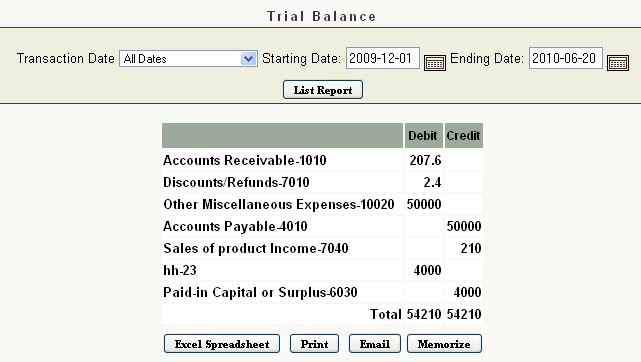
The steps involved are as follows.
• Choose Reports-->Reports review-->Trial Balance.
• The report shows the credit and debit balances for each account.
• You can restrict the report details by selecting dates.
• You can either print the report using print option or export the report to Microsoft excel sheet. You can also able to email it or memorize.
Payroll Accounting in Numia
Payroll is the sum of all financial records of salaries, wages, bonuses and deductions. In accounting, payroll refers to the amount paid to employees for services, they provided during a certain period of time. Payroll accounting is profitable as you manage and balance small and medium sized businesses.
Online Accounting software, Numia provides you an easier way to calculate and to keep track of the payroll informations of your employees. Add your employee details by entering the required informations. Once you have added the pay tax, pay schedule and deductions of your company, you can easily add payroll for each and every employee. The Screenshot in Numia for adding payroll is shown below:

It can be done by following these steps.
• Choose Add Payroll from the Employee menu.
• Choose the pay schedule for the employee.
• Select the Employee name and enter the rate and quantity for the payroll.
• The net pay will be calculated automatically.
• Click “Add Payroll” to save the payroll created for that employee.
You can also create paychecks for each employee by selecting bank name, account name and entering the check number.
Online Accounting software, Numia provides you an easier way to calculate and to keep track of the payroll informations of your employees. Add your employee details by entering the required informations. Once you have added the pay tax, pay schedule and deductions of your company, you can easily add payroll for each and every employee. The Screenshot in Numia for adding payroll is shown below:

It can be done by following these steps.
• Choose Add Payroll from the Employee menu.
• Choose the pay schedule for the employee.
• Select the Employee name and enter the rate and quantity for the payroll.
• The net pay will be calculated automatically.
• Click “Add Payroll” to save the payroll created for that employee.
You can also create paychecks for each employee by selecting bank name, account name and entering the check number.
Subscribe to:
Posts (Atom)